




Java continues to be one of the most popular programming languages for software development, web applications, Android development, enterprise solutions, cloud computing, and automation. Whether you’re a student, a fresher preparing for interviews, or a working professional brushing up on your coding skills, practicing Java programs is one of the most effective ways to master the language.
Coding is not just about memorizing syntax. It is about learning how to solve problems. Every Java program you write strengthens your understanding of variables, loops, conditions, arrays, object-oriented programming, exception handling, collections, and many other core concepts. That is why almost every Java course and technical interview emphasizes writing programs instead of simply reading theory.
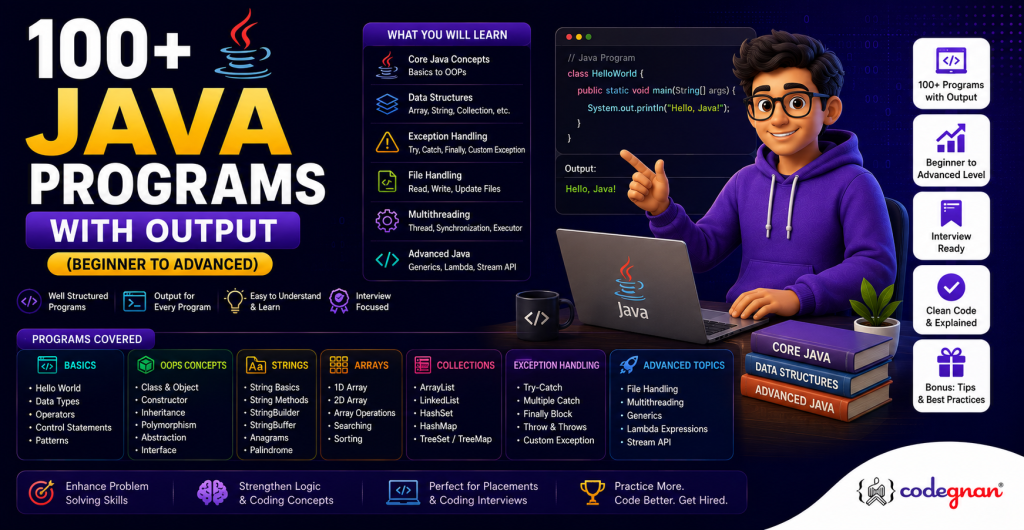
This comprehensive guide contains more than 100 Java programs organized from beginner to advanced levels. Instead of presenting random coding questions, the programs are grouped into logical categories that gradually increase in complexity. This structured learning path helps you build confidence while improving your logical thinking.
In this guide, you will learn:
- Basic Java programs for beginners
- Number-based programming problems
- Pattern printing programs
- Array and string manipulation programs
- Object-oriented programming examples
- Advanced Java concepts
- Interview-focused coding questions
Whether your goal is to pass university exams, crack coding interviews, or become a better Java developer, this collection will help you practice the right problems in the right order.
Why Practice Java Programs?
Reading tutorials alone will not make you a good programmer. Programming is a practical skill that improves through consistent coding.
Practicing Java programs helps you:
- Build logical thinking
- Improve debugging skills
- Learn Java syntax naturally
- Understand object-oriented programming concepts
- Prepare for coding interviews
- Solve real-world programming problems
- Write efficient and optimized code
Most software companies evaluate candidates through coding assessments. Questions related to loops, arrays, strings, recursion, object-oriented programming, and collections appear regularly during technical interviews.
The more programs you practice, the easier it becomes to recognize patterns and develop efficient solutions.
Learning Path Covered in This Guide
| Level | Topics |
|---|---|
| Beginner | Input, Output, Variables, Data Types, Operators |
| Basic Logic | Conditions, Loops, Number Programs |
| Intermediate | Arrays, Strings, Patterns |
| Advanced | OOP, Exception Handling, Collections |
| Expert | Multithreading, JDBC, Lambda Expressions, Streams |
Instead of jumping directly into advanced topics, start with the basics and gradually move toward real-world programming concepts.
Java Programs for Beginners (Programs 1 to 30)
If you are new to Java, these programs will help you understand how the language works. The first thirty programs focus on basic syntax, variables, user input, operators, conditional statements, and loops. These concepts serve as the building blocks for every Java application you will develop later.
Do not rush through these programs. Write each one yourself, modify the code, experiment with different inputs, and observe how the output changes.
Input and Output Programs
Input and output operations are the first concepts every Java programmer learns. They teach you how to interact with users and display information on the console.
1. Hello World Program
This is traditionally the first Java program every beginner writes.
public class HelloWorld {
    public static void main(String[] args) {
        System.out.println("Hello World");
    }
}
Output
Hello WorldWhat You Learn
- Java class structure
- main() method
- System.out.println()
- Compiling and running Java programs
2. Print an Integer Entered by the User
This program introduces the Scanner class.
Scanner sc = new Scanner(System.in);
int number = sc.nextInt();
System.out.println(number);
Output
25
25
Concepts Covered
- User input
- Integer variables
- Scanner object
3. Read and Print a String
Strings represent textual information.
Scanner sc = new Scanner(System.in);
String name = sc.nextLine();
System.out.println(name);
Output
John
John
Skills Developed
- Reading user input
- Working with String objects
4. Add Two Numbers
This program introduces arithmetic operators.
int a = 10;
int b = 20;
System.out.println(a + b);
Output
30Why It Matters
Almost every programming problem begins with performing arithmetic operations.
5. Swap Two Numbers
Swapping numbers teaches temporary variables and assignment.
Example:
Before Swap

A = 5
B = 10

After Swap

A = 10
B = 5
Later, practice swapping numbers without using a temporary variable.
6. Find ASCII Value of a Character
Characters are internally represented by numeric ASCII or Unicode values.
Example:
Input

A

Output

65
Understanding character encoding becomes useful during string manipulation.
7. Print User Name and Age
Learn how multiple variables can be displayed together.
Example:
Name : Rahul

Age : 22
8. Read Float and Double Values
Java supports multiple numeric data types.
Example:
Float : 12.5

Double : 1256.789
9. Display Current Date and Time
This program introduces Java’s built-in date libraries.
Example Output:
2026-08-05 11:45 AM10. Print Multiple Lines
Learn formatted console output.
Example:
Student Information

Name : Rahul

Course : Java

City : Hyderabad
Formatting output becomes useful while creating reports and menu-driven applications.
Variables and Data Types Programs
Variables store information inside memory. Choosing the correct data type improves program efficiency and readability.
11. Declare All Primitive Data Types
Java provides eight primitive data types.
| Data Type | Example |
|---|---|
| byte | 100 |
| short | 2000 |
| int | 100000 |
| long | 100000000 |
| float | 25.5 |
| double | 125.789 |
| char | A |
| boolean | true |
Understanding their storage sizes helps you write optimized programs.
12. Demonstrate Type Casting
Java supports:
- Implicit casting
- Explicit casting
Example:
int → double

double → int
This concept becomes important when working with mathematical calculations.
13. Convert int to double
Simple conversion example.
25

↓

25.0
14. Convert double to int
Example:
25.98

↓

25
Notice that decimal values are truncated.
15. Convert char to int
'A'

↓

65
This concept is widely used in character processing programs.
16. Local and Global Variables
Understand variable scope.
Learn the difference between:
- Local variables
- Instance variables
- Static variables
This is an important interview topic.
17. Final Variables
The final keyword creates constants.
Example:
PI = 3.14159Constants improve code readability and prevent accidental modifications.
18. Print Variable Values
A simple exercise that reinforces variable declaration and initialization.
19. Display Data Type Sizes
Learn approximate memory allocation.
Example
| Type | Size |
|---|---|
| byte | 1 Byte |
| short | 2 Bytes |
| int | 4 Bytes |
| long | 8 Bytes |
Understanding memory becomes increasingly important when handling large datasets.
20. Concatenate Strings and Variables
Example:
Hello Rahul

Welcome to Java Programming
This introduces string concatenation using the + operator.
Java Operator Programs
Operators allow programs to perform calculations, comparisons, and logical evaluations. Mastering operators early makes solving programming problems much easier.
21. Arithmetic Operators
Practice:
- Addition
- Subtraction
- Multiplication
- Division
- Modulus
These operators form the foundation of mathematical programming.
22. Find Remainder
Example:
25 % 4

Output

1
The modulus operator is widely used in number-based programming questions.
23. Relational Operators
Compare values using:
- <
-
=
- <=
- ==
- !=
Example
10 > 5

true
24. Logical Operators
Learn:
- &&
- ||
- !
Logical operators are heavily used inside conditional statements.
25. Ternary Operator
Instead of writing:
if(age>=18)You can write:
(age>=18) ? "Eligible" : "Not Eligible";This makes simple decision-making code concise and readable.
26. Unary Operators
Practice:
- Increment
- Decrement
- Unary plus
- Unary minus
27. Bitwise Operators
Learn how binary operations work.
Topics include:
- AND
- OR
- XOR
- Left Shift
- Right Shift
Although less common for beginners, these operators are useful in systems programming and optimization.
28. Increment and Decrement Examples
Understand the difference between:
i++

++i
This is a frequently asked interview question.
29. Compare Two Values
Create a program that determines whether one number is greater than, smaller than, or equal to another.
This reinforces conditional statements and comparison operators.
30. Evaluate a Simple Expression
Combine arithmetic, relational, and logical operators in a single expression to understand operator precedence.
Example:
int a = 5;
int b = 10;
int c = 15;

boolean result = (a + b > c) && (b < c);
System.out.println(result);
Output
falseLearning operator precedence early helps prevent logical errors in more complex programs.
Key Takeaways from Beginner Programs
The first 30 Java programs establish the foundation for everything else in your Java learning journey. By completing them, you will understand how to accept user input, work with variables and data types, perform calculations, use operators, and write simple decision-making logic.
Do not move to advanced topics until you are comfortable writing these programs without referring to notes. A strong foundation will make learning arrays, strings, object-oriented programming, and advanced Java concepts much easier.
Java Number Programs (31 to 50)
Once you are comfortable with variables, loops, operators, and conditional statements, the next step is solving number-based programming problems. These programs help you build logical thinking, understand mathematical concepts, and improve problem-solving skills.
Number programs are among the most frequently asked coding questions in college practical exams, online coding assessments, and technical interviews. They teach you how to combine loops, conditions, arithmetic operations, and functions to solve real programming challenges.
By practicing these programs, you will become more confident in writing efficient Java code and handling common algorithmic problems.
Why Number Programs Are Important
Number-based problems strengthen your understanding of:
- Conditional statements
- For, while, and do-while loops
- Mathematical operators
- Functions and methods
- Recursion
- Time complexity
- Logical reasoning
Many interview questions are simply variations of these classic problems. Once you understand the logic, solving more advanced coding challenges becomes much easier.
Prime Number Programs
Prime number questions are some of the most common Java interview problems. A prime number is divisible only by 1 and itself.
Examples:
- 2
- 3
- 5
- 7
- 11
- 13
Non-prime numbers include:
- 4
- 6
- 8
- 9
- 10
A common optimization is checking divisibility only up to the square root of the given number instead of testing every value.
31. Check Whether a Number is Prime
Sample Input
29Output
29 is a Prime NumberConcepts Learned
- Looping
- Conditional statements
- Modulus operator
- Boolean variables
32. Print Prime Numbers from 1 to N
Instead of checking a single number, this program generates all prime numbers within a given range.
Example
Input

50
Output
2 3 5 7 11 13 17 19 23 29 31 37 41 43 47This exercise teaches nested loops and repeated logical evaluation.
33. Count Prime Numbers in a Range
Rather than printing primes, count how many exist.
Example
Input

1 to 100
Output
25 Prime NumbersThis introduces counters and efficient iteration.
34. Find the Nth Prime Number
Instead of checking a range, continue generating prime numbers until the required position is reached.
Example
Input

10
Output
29This problem is popular in coding interviews because it combines loops and optimized prime checking.
35. Print Prime Numbers Between Two Numbers
Example
Input

50
100
Output
53 59 61 67 71 73 79 83 89 97This is an extension of the previous problems and introduces handling two user inputs.
Armstrong Number Programs
An Armstrong number is a number equal to the sum of its digits raised to the power of the total number of digits.
Examples:
- 153
- 370
- 371
- 407
These questions strengthen digit extraction logic.
36. Check Armstrong Number
Example
Input

153
Output
153 is an Armstrong NumberConcepts Covered
- Modulus operator
- Integer division
- Power calculations
- Loops
37. Print Armstrong Numbers in a Range
Example
Input

1 to 1000
Output
1 153 370 371 407This combines nested loops with mathematical operations.
38. Count Digits in a Number
Example
Input

987654
Output
6Digit counting is used in several mathematical programming problems.
39. Compare Sum of Digit Powers with Number
This program focuses only on calculating the Armstrong value before comparing it with the original number.
It helps beginners understand the underlying algorithm.
40. Display Armstrong Series
Generate all Armstrong numbers within a user-defined limit.
This program improves understanding of reusable methods.
Palindrome Number Programs
A palindrome number reads the same forward and backward.
Examples:
- 121
- 343
- 1221
Non-palindrome examples:
- 123
- 456
These problems teach reversing numbers.
41. Check Palindrome Number
Example
Input

121
Output
Palindrome NumberThe logic involves reversing the digits and comparing them with the original number.
42. Reverse a Number
Example
Input

12345
Output
54321This problem is often used before palindrome questions because it introduces the required algorithm.
43. Print Palindrome Numbers in a Range
Example
Input

1 to 500
Output
1
2
3
...
494
Students learn how to combine two different algorithms into one solution.
44. Find the Next Palindrome Number
Example
Input

145
Output
151Interviewers often use this problem to test logical thinking.
45. Display Palindrome Series
Generate the first N palindrome numbers. This introduces counting along with repeated validation.
Factorial Programs
Factorial is one of the first mathematical functions programmers learn.
Formula:
5!

=

5 × 4 × 3 × 2 × 1

=

120
Factorial problems teach loops, recursion, and multiplication.
46. Find Factorial Using Loop
Example
Input

5
Output
120Loop-based factorial programs are simple and efficient for beginners.
47. Find Factorial Using Recursion
Instead of loops, this version calls the same method repeatedly.
Example
factorial(5)

↓

factorial(4)

↓

factorial(3)
Students learn how recursive calls work and when recursion is appropriate.
48. Factorial Using a Function
Instead of writing everything inside the main() method, create a reusable method.
Benefits include:
- Better readability
- Reusability
- Cleaner code
49. Sum of Factorial Digits
Example
Input

145
Output
145 is a Strong NumberThis question combines factorial logic with digit extraction.
50. Factorial Series
Generate factorial values for multiple numbers.
Example
1! = 1

2! = 2

3! = 6

4! = 24

5! = 120
This program helps learners understand cumulative multiplication.
Common Mistakes Beginners Make in Number Programs
While practicing number-based problems, beginners often encounter similar issues. Recognizing these mistakes early can save time and improve coding skills.
Forgetting to Preserve the Original Number
When reversing digits or checking Armstrong and palindrome numbers, many learners modify the original number without saving its value. Always store the original number in a separate variable before processing.
Incorrect Loop Conditions
Using the wrong loop condition can result in infinite loops or incorrect outputs. Carefully check your loop initialization, condition, and update statement.
Ignoring Edge Cases
Test your programs with values such as:
- 0
- 1
- Negative numbers
- Large numbers
Handling edge cases is an important part of writing reliable code.
Overusing Nested Loops
Nested loops are useful but can make programs slower. As you progress, learn optimized algorithms that reduce unnecessary iterations.
Hardcoding Values
Avoid writing programs that only work for fixed numbers. Accept input from users whenever possible so your programs become reusable.
Tips for Mastering Number Programs
- Understand the logic before writing code.
- Solve the problem manually on paper first.
- Trace each iteration using sample inputs.
- Practice one category every day.
- Rewrite the same program without looking at previous solutions.
- Compare iterative and recursive approaches.
- Analyze the time complexity of your solutions.
- Use meaningful variable names for better readability.
Consistent practice will help you recognize patterns and solve similar problems more quickly during interviews.
Java Pattern Programs (51 to 65)
Pattern programs may appear simple, but they are excellent exercises for developing logical thinking. They teach you how nested loops work, how to control rows and columns, and how to manage spacing and alignment in console output.
Many technical interviews include pattern-based questions because they evaluate your understanding of loops rather than your ability to memorize syntax.
There are three major categories of pattern programs:
- Star patterns
- Number patterns
- Alphabet patterns
Each category strengthens your understanding of nested loops in a different way.
Why Pattern Programs Matter
Pattern programs help you learn:
- Nested loops
- Conditional statements
- Loop counters
- Output formatting
- Logical thinking
- Matrix-style iteration
Once you become comfortable with patterns, solving array and matrix problems becomes much easier.
Star Pattern Programs
Star patterns are usually the first nested-loop exercises beginners attempt.
51. Right Triangle Star Pattern
Example
*
**
***
****
*****
Concepts Covered
- Outer loop for rows
- Inner loop for columns
52. Left Triangle Star Pattern
Example
    *
   **
  ***
 ****
*****
This introduces spacing logic along with nested loops.
53. Inverted Star Triangle
Example
*****
****
***
**
*
This teaches reverse iteration.
54. Square Star Pattern
Example
*****
*****
*****
*****
*****
A simple exercise to understand fixed-size nested loops.
55. Hollow Square Star Pattern
Example
*****
*   *
*   *
*   *
*****
This combines nested loops with conditional statements.
Number Pattern Programs
Instead of printing stars, these programs display numbers in different arrangements.
56. Number Triangle
Example
1
12
123
1234
12345
57. Inverted Number Triangle
Example
12345
1234
123
12
1
58. Floyd’s Triangle
Example
1
2 3
4 5 6
7 8 9 10
Floyd’s Triangle is frequently used to teach incrementing counters.
59. Repeated Number Rows
Example
1
22
333
4444
This demonstrates how row values can influence printed output.
60. Incrementing Number Pyramid
Example
    1
   232
  34543
 4567654
This combines spacing, incrementing values, and symmetry.
Alphabet Pattern Programs
Alphabet patterns extend the same looping concepts using characters instead of numbers.
61. Alphabet Triangle
Example
A
AB
ABC
ABCD
ABCDE
62. Reverse Alphabet Triangle
Example
ABCDE
ABCD
ABC
AB
A
63. Repeated Alphabet Pattern
Example
A
BB
CCC
DDDD
64. Alphabet Pyramid
Example
    A
   ABA
  ABCBA
 ABCDCBA
65. Alphabet Diamond
Example
    A
   ABA
  ABCBA
 ABCDCBA
  ABCBA
   ABA
    A
The alphabet diamond is one of the most popular pattern questions in programming interviews because it combines nested loops, spacing, and character manipulation.
Key Takeaways
By completing Programs 31 to 65, you will have developed strong logical thinking and gained confidence with loops, conditions, recursion, and nested iteration. These exercises prepare you for more practical programming concepts such as arrays, strings, and object-oriented programming.
Arrays, strings, and object-oriented programming represent the transition from learning Java syntax to building real applications. Most coding interviews, university exams, and software development projects rely heavily on these three topics.
Once you understand arrays, you can efficiently manage collections of data. String manipulation helps you solve text-processing problems, while object-oriented programming enables you to build scalable and maintainable applications.
These concepts also serve as prerequisites for advanced Java topics such as collections, multithreading, Spring Boot, and enterprise application development.
Java Array Programs (66 to 80)
Arrays are one of the most fundamental data structures in Java. Instead of storing individual variables for similar data, arrays allow you to store multiple values of the same type in a single variable.
For example, instead of creating:
int mark1 = 85;
int mark2 = 90;
int mark3 = 76;
You can simply write:
int[] marks = {85,90,76};Arrays make programs cleaner, faster, and easier to maintain.
Why Learn Arrays?
Arrays help you:
- Store multiple values efficiently
- Traverse data using loops
- Perform searching and sorting
- Build matrices
- Prepare for advanced data structures
- Solve coding interview problems
Almost every technical interview includes at least one array-related question.
66. Print Array Elements
The simplest array program displays every element one by one.
Example
Input

10 20 30 40 50

Output

10
20
30
40
50
Concepts Covered
- Array declaration
- Initialization
- For loop traversal
67. Find Sum of Array Elements
Instead of printing values, calculate the total.
Example
Input

5 10 15 20

Output

50
This introduces accumulator variables.
68. Find Average of Array Elements
Average is calculated as:
Average = Sum / Number of ElementsExample
Input

10 20 30 40

Output

25
Understanding averages is useful in grading systems and data analysis.
69. Find Maximum Element
Example
Input

12 45 8 99 54

Output

99
This program teaches comparison logic while traversing arrays.
70. Find Minimum Element
Example
Input

12 45 8 99 54

Output

8
Maximum and minimum problems are among the most common coding interview questions.
71. Count Even and Odd Numbers
Example
Input

10 15 20 25 30

Output

Even = 3

Odd = 2
This combines loops with conditional statements.
72. Reverse an Array
Example
Original

10 20 30 40 50

Reversed

50 40 30 20 10
This teaches index manipulation.
73. Remove Duplicate Elements
Example
Input

10 20 10 30 20

Output

10 20 30
This introduces comparison between array elements.
74. Merge Two Arrays
Example
Array 1

1 2 3

Array 2

4 5 6

Merged

1 2 3 4 5 6
Useful for understanding memory allocation.
75. Rotate an Array
Example
Original

1 2 3 4 5

Rotate Left

2 3 4 5 1
Array rotation appears frequently in coding assessments.
Two-Dimensional Array Programs
Two-dimensional arrays represent rows and columns.
They are widely used for:
- Matrices
- Image processing
- Game boards
- Tables
- Spreadsheet applications
76. Print 2D Array
Example
1 2 3

4 5 6

7 8 9
This introduces nested loops.
77. Add Two Matrices
Example
Matrix A

1 2

3 4

Matrix B

5 6

7 8

Output

6 8

10 12
Students learn matrix traversal.
78. Multiply Two Matrices
Matrix multiplication combines nested loops with arithmetic operations. Although slightly more complex, it is an excellent exercise for mastering indexing.
79. Find Matrix Transpose
Example
Original

1 2 3

4 5 6

Transpose

1 4

2 5

3 6
This concept is used in mathematics and machine learning.
80. Find Diagonal Sum
Example
1 2 3

4 5 6

7 8 9

Output

15
Diagonal calculations strengthen indexing skills.
Tips for Mastering Arrays
- Always check array boundaries.
- Remember that indexing starts from zero.
- Practice both one-dimensional and two-dimensional arrays.
- Learn searching before sorting.
- Understand the time complexity of array operations.
Java String Programs (81 to 90)
Strings are among the most frequently tested topics in Java interviews. Almost every real-world application processes textual data.
Examples include:
- User names
- Passwords
- Emails
- Messages
- Search functionality
- Reports
Java strings are immutable, meaning their values cannot be changed after creation. Understanding this concept is essential for writing efficient programs.
81. Find String Length
Example
Input

Codegnan

Output

8
Introduces the length() method.
82. Convert to Uppercase
Example
Input

java

Output

JAVA
Frequently used for standardizing text.
83. Convert to Lowercase
Example
Input

JAVA

Output

java
Useful for case-insensitive comparisons.
84. Remove Spaces
Example
Input

Java Programming Language

Output

JavaProgrammingLanguage
Important in data cleaning.
85. Replace Characters
Example
Input

banana

Replace

a → o

Output

bonono
Introduces the replace() method.
String Logic Programs
86. Reverse a String
Example
Input

Java

Output

avaJ
Popular interview question.
87. Reverse Words in a Sentence
Example
Input

Learn Java Today

Output

Today Java Learn
Useful in text processing applications.
88. Check Palindrome String
Example
Input

madam

Output

Palindrome
This extends the palindrome concept from numbers to strings.
89. Check Anagram Strings
Example
listen

silent
Output
AnagramInterviewers frequently ask anagram problems because they evaluate sorting and character comparison.
90. Count Vowels and Consonants
Example
Input

Programming

Output

Vowels = 3

Consonants = 8
This combines loops with character classification.
Common String Interview Questions
Besides these programs, interviewers frequently ask candidates to:
- Count character frequency
- Remove duplicate characters
- Find the first non-repeating character
- Find the longest word
- Compare two strings
- Check rotations
- Compress strings
Practicing these problems will strengthen your understanding of Java’s String class.
Java OOP Programs (91 to 100)
Object-Oriented Programming is the heart of Java. Unlike procedural programming, OOP organizes code into reusable objects. Four core principles define OOP:
- Encapsulation
- Inheritance
- Polymorphism
- Abstraction
Understanding these principles is essential for developing enterprise applications.
Classes and Objects
91. Create a Class and Object
This is the first object-oriented program every Java learner writes.
Example
Student s = new Student();This teaches object creation.
92. Use Constructor
Constructors initialize object values automatically.
Example
Student("Rahul",21);Constructors simplify object initialization.
93. Use Methods in a Class
Instead of writing everything inside main(), organize functionality into methods.
Benefits include:
- Better readability
- Reusability
- Easier debugging
94. Pass Object to a Method
Objects can be passed just like variables.
This teaches reference handling.
95. Print Object State
Example
Student

Name : Rahul

Age : 21

Course : Java
Students learn how objects store multiple pieces of related information.
Inheritance and Polymorphism
Inheritance allows one class to reuse another class.
96. Single Inheritance
Example
Animal

↓

Dog
The child class inherits properties from the parent.
97. Multilevel Inheritance
Example
Animal

↓

Mammal

↓

Dog
This demonstrates inheritance across multiple levels.
98. Method Overloading
Multiple methods share the same name but different parameters.
Example
add(int,int)

add(double,double)

add(int,int,int)
This is compile-time polymorphism.
99. Method Overriding
The child class provides its own implementation.
Example
Vehicle

↓

Car
Both classes contain the same method name with different implementations.
100. Runtime Polymorphism
Example
Vehicle vehicle = new Car();
vehicle.start();
This demonstrates dynamic method dispatch.
Runtime polymorphism is one of the most important Java interview topics because it showcases the power of inheritance and abstraction.
Best Practices for Learning OOP
As you begin writing object-oriented programs, keep these practices in mind:
- Create small, focused classes with a single responsibility.
- Use meaningful class and method names.
- Keep data private and expose it through methods where appropriate.
- Favor composition when it makes the design simpler.
- Avoid duplicating code by using inheritance carefully.
- Write reusable methods instead of repeating logic.
Following these principles will make your programs easier to maintain and prepare you for frameworks such as Spring Boot and Hibernate.
Key Takeaways
Programs 66 to 100 introduce three of the most important areas in Java development. Arrays teach you how to organize and process collections of data, string programs strengthen your ability to manipulate text, and object-oriented programming provides the foundation for designing scalable applications.
By mastering these topics, you will be well prepared to move on to advanced Java concepts such as exception handling, collections, multithreading, file handling, JDBC, lambda expressions, and the Stream API.
Advanced Java programming takes you beyond basic syntax and object-oriented programming into concepts used in real-world software development. These topics are essential for building enterprise applications, desktop software, web applications, APIs, and backend systems.
If you have mastered variables, loops, arrays, strings, and OOP, you are ready to learn how Java handles exceptions, manages collections, performs file operations, works with databases, executes multiple threads, and processes data using lambda expressions and streams.
This final section completes your journey from beginner to advanced Java programming and prepares you for technical interviews as well as professional software development. The structure below expands the advanced section from your original outline.
Advanced Java Programs (101 to 120)
These programs introduce concepts that are commonly used in enterprise applications and frequently appear in coding interviews for Java developers.
Exception Handling Programs
Exception handling allows a program to continue running even when unexpected errors occur. Instead of crashing, the program can identify the problem and respond appropriately. Proper exception handling improves application stability and user experience.
101. Try Catch Example
This program demonstrates how Java catches runtime exceptions.
Example
try {
    int result = 10 / 0;
} catch (ArithmeticException e) {
    System.out.println("Cannot divide by zero");
}
Output
Cannot divide by zeroSkills Learned
- Runtime exceptions
- Error handling
- Program stability
102. Multiple Catch Blocks
A program can throw different types of exceptions.
Example
- ArithmeticException
- NumberFormatException
- ArrayIndexOutOfBoundsException
Understanding multiple catch blocks helps developers write more reliable applications.
103. Finally Block
The finally block executes whether an exception occurs or not.
Typical uses include:
- Closing files
- Closing database connections
- Releasing resources
104. Throw Exception
Developers can create their own exceptions using the throw keyword.
Example
if(age < 18)
    throw new IllegalArgumentException("Not Eligible");
105. Throws Keyword
The throws keyword informs the compiler that a method may generate an exception.
It improves readability and encourages proper exception handling throughout an application.
Collections Framework Programs
The Collections Framework provides dynamic data structures that are far more flexible than arrays.
Common collection classes include:
- ArrayList
- LinkedList
- HashSet
- HashMap
- TreeSet
- PriorityQueue
Collections are heavily used in enterprise Java applications.
106. ArrayList Example
Example
ArrayList<String> students = new ArrayList<>();Typical operations include:
- Add
- Remove
- Update
- Search
107. LinkedList Example
Linked lists are efficient when inserting or deleting elements frequently.
Example applications include:
- Browser history
- Music playlists
- Navigation systems
108. HashSet Example
HashSet stores unique values.
Example
Input

10 20 20 30

Output

10 20 30
Useful when duplicate values should be removed automatically.
109. HashMap Example
HashMap stores data as key-value pairs.
Example
101 → Rahul

102 → Priya

103 → Arjun
HashMap is widely used for caching, configuration management, and lookup operations.
110. Iterate Through Collections
Practice different traversal techniques:
- Enhanced for loop
- Iterator
- forEach()
- Stream API
Understanding these approaches helps you write cleaner and more efficient code.
File Handling Programs
Most real-world applications need to read from or write to files.
Java provides several APIs for file handling.
111. Create a File
Learn how to create a new text file using Java.
Applications include:
- Reports
- Logs
- Configuration files
112. Write to a File
Store user-generated content in a file.
Example
Student Report

Rahul

95
113. Read from a File
Retrieve stored information.
Example
Reading employee records...

Completed Successfully
114. Append Data to a File
Instead of overwriting existing content, append new information.
This technique is commonly used for log files and transaction histories.
115. Delete a File
Understand how Java removes files safely from the system.
Multithreading Programs
Multithreading allows multiple tasks to run concurrently. It improves performance in applications such as:
- Web servers
- Games
- Banking systems
- Video streaming
- Chat applications
116. Create Thread Using Thread Class
This introduces thread creation by extending the Thread class.
117. Create Thread Using Runnable Interface
Most enterprise applications prefer the Runnable interface because it offers greater flexibility.
118. Thread Sleep Example
Pause thread execution for a specified duration.
Example
Thread.sleep(1000);This is commonly used for scheduling and animations.
119. Thread Join Example
The join() method ensures one thread completes before another continues.
This helps coordinate dependent tasks.
120. Daemon Thread Example
Daemon threads run in the background and support application services.
Examples include:
- Garbage collection
- Background monitoring
- Scheduler tasks
JDBC, Lambda Expressions, and Stream API
These concepts are among the most valuable advanced Java skills because they connect applications with databases and modern functional programming.
JDBC Programs
Practice creating programs that:
- Connect to a MySQL database
- Insert records
- Update records
- Delete records
- Retrieve records
Lambda Expressions
Lambda expressions reduce boilerplate code by enabling concise function definitions.
Example
numbers.forEach(n -> System.out.println(n));Stream API
The Stream API simplifies processing collections.
Common operations include:
- filter()
- map()
- sorted()
- collect()
- reduce()
These features are widely used in modern Java applications and backend frameworks.
Java Programs by Difficulty
| Level | Topics Covered |
|---|---|
| Beginner | Input, output, variables, data types, operators, loops, conditions |
| Intermediate | Number programs, pattern programs, arrays, strings, searching, sorting |
| Advanced | OOP, exception handling, collections, file handling |
| Professional | JDBC, multithreading, lambda expressions, Stream API |
Progress through these levels gradually. Do not skip foundational concepts because advanced topics depend heavily on your understanding of the basics.
Most Important Java Programs for Interviews
While all the programs in this guide are valuable, recruiters frequently ask questions based on a core set of problems.
Beginner Level
- Hello World
- Even or odd
- Largest of three numbers
- Leap year
- Calculator
- Swap numbers
- Fibonacci series
- Factorial
- Prime number
Intermediate Level
- Palindrome number
- Armstrong number
- Reverse number
- GCD and LCM
- Matrix addition
- Matrix transpose
- Array reversal
- Maximum and minimum element
- Bubble sort
- Binary search
String Programs
- Reverse string
- Palindrome string
- Anagram
- Character frequency
- Remove duplicates
- Count vowels and consonants
Object-Oriented Programming
- Constructor
- Inheritance
- Method overloading
- Method overriding
- Runtime polymorphism
- Interfaces
- Abstract classes
Advanced Java
- Exception handling
- ArrayList
- HashMap
- File handling
- Multithreading
- JDBC
- Lambda expressions
- Stream API
Interviewers often evaluate not just whether your program works, but also whether your code is clean, efficient, and easy to understand.
Java Learning Roadmap
If you are starting from scratch, follow this structured roadmap.
Stage 1: Java Fundamentals
- Install JDK
- Learn IDE basics
- Variables
- Data types
- Operators
- Input and output
- Loops
- Methods
Stage 2: Logic Building
Practice:
- Number programs
- Pattern programs
- Arrays
- Strings
- Recursion
Stage 3: Object-Oriented Programming
Learn:
- Classes
- Objects
- Constructors
- Encapsulation
- Inheritance
- Polymorphism
- Abstraction
- Interfaces
Stage 4: Advanced Java
Study:
- Exception handling
- Collections Framework
- File handling
- Multithreading
- JDBC
- Lambda expressions
- Stream API
Stage 5: Frameworks
Move to:
- Spring Boot
- Hibernate
- REST APIs
- Maven
- Git
- Docker
Completing these stages will prepare you for Java backend development roles.
Best Practices for Practicing Java Programs
To improve your coding skills consistently:
- Write every program manually instead of copying code.
- Test your programs with different inputs.
- Handle invalid or unexpected input gracefully.
- Focus on understanding the logic before optimizing performance.
- Review and refactor older solutions to improve readability.
- Learn the time and space complexity of common algorithms.
- Participate in coding challenges and mock interviews.
Building strong programming habits early will help you become a better software developer.
Conclusion
Practicing Java programs is one of the fastest ways to become confident in programming. Each program introduces a new concept while reinforcing previously learned topics. By working through beginner exercises, number problems, pattern programs, arrays, strings, object-oriented programming, and advanced Java concepts, you build both technical knowledge and problem-solving skills.
The key to success is consistency. Solve a few programs every day, experiment with different approaches, and gradually increase the difficulty level. Over time, these exercises will help you write cleaner code, perform better in technical interviews, and develop real-world Java applications with confidence.
Whether you are preparing for college exams, coding competitions, or software engineering interviews, this collection of more than 100 Java programs provides a structured path from beginner to advanced programming.
Frequently Asked Questions
1. Which Java programs should beginners practice first?
Start with input and output, variables, operators, loops, conditional statements, prime numbers, factorial, Fibonacci series, and simple array programs. These topics provide the foundation for more advanced concepts.
2. Are these Java programs suitable for interview preparation?
Yes. Many technical interviews include questions on arrays, strings, object-oriented programming, sorting, searching, recursion, and collections. Practicing these programs will improve both coding speed and logical thinking.
3. Do I need to learn object-oriented programming before practicing advanced Java?
Yes. Understanding classes, objects, inheritance, polymorphism, encapsulation, and abstraction makes advanced topics such as collections, JDBC, and multithreading much easier to learn.
4. Which Java programs are most important for freshers?
Freshers should focus on loops, arrays, strings, recursion, object-oriented programming, exception handling, and collections because these topics appear frequently in coding assessments.
5. How can I improve my Java programming skills?
Practice consistently, solve one category of problems at a time, write programs without referring to solutions, review your mistakes, and work on small real-world projects to reinforce your understanding.
6. Are pattern programs useful for interviews?
Yes. Pattern programs strengthen your understanding of nested loops, spacing logic, and output formatting, making them valuable for interview preparation.
7. Which Java topics should I master before learning frameworks like Spring Boot?
You should have a strong understanding of Java syntax, object-oriented programming, exception handling, collections, multithreading, file handling, JDBC, and the Stream API before moving on to frameworks.
8. Can I download these Java programs as a PDF?
Yes. After publishing this guide, you can use your browser’s Print to PDF feature or export it from your content management system for offline reading.
9. How long does it take to complete all 100 Java programs?
The timeline depends on your experience and practice schedule. Most learners can complete and understand the entire collection within a few weeks of consistent daily practice.
10. Are advanced Java programs included in this guide?
Yes. This guide covers exception handling, collections, file handling, multithreading, JDBC, lambda expressions, and the Stream API to help learners transition from core Java to real-world application development.